
Every month, your employer may deduct Pay As You Earn (PAYE) tax from your salary and remit it to the relevant tax authority on your behalf.
But here is an important question: How do you know that the tax deducted from your salary has actually been filed and paid?
Receiving your salary after tax deductions does not automatically mean that your employer has completed the filing and payment process.
The good news is that you do not have to rely solely on verbal assurances. You can take steps to verify your PAYE records and seek clarification when something does not look right.
Welcome to CrossRiverPay 360 Gov, where your tax journey is becoming simpler, more transparent, and more digital.
Let's walk through what you need to know.
1. First, Understand the Difference Between Filing and Payment
Before checking your PAYE records, it is important to understand that filing and payment are two different things.
PAYE filing is the process through which your employer submits the required information about employees' earnings and the PAYE tax due for a particular period.
PAYE payment, or remittance, is the process of transferring the tax collected to the appropriate government account through the approved payment process.
An employer may have prepared a return without completing the payment. A payment may also require further processing or reconciliation before the relevant records are fully updated.
Therefore, checking only one part of the process may not give you the complete picture.
You need to establish whether the relevant return was filed, what happened to the payment, and whether the records have been properly processed.
2. Get Your Information Ready
Before checking your records, gather the following information:
Your Tax Identification Number (TIN), where applicable.
The name of your employer.
The month or period you want to verify.
Your payslip showing your salary and PAYE deduction.
Any PAYE statement, tax schedule, or payment evidence your employer has provided.
These details will help you identify the relevant period and explain any discrepancy to your employer or the Cross River State Internal Revenue Service (CRIRS).
Keep your payslips and relevant tax records safe. They can be useful when reconciling your employment income and tax history.
3. Visit CrossRiverPay 360 Gov as an individual
Start by visiting the official CrossRiverPay 360 Gov platform with your persona TIN:
https://pay.crossriverstate.gov.ng/
Depending on the services and access permissions available to you, you may be able to review relevant taxpayer information through your account.
If you already have an account, sign in using your existing credentials.
If you don't already have an account, please visit the link on How to sign in or sign up to Crossriverpay 360 Gov
If you do not have an account, follow the platform's available registration or account-access instructions.
Important: Your personal taxpayer account may not display every detail of your employer's monthly PAYE filing. Access to employer filing records may depend on the functions enabled on the platform and the permissions assigned to your account.
Do not assume that the absence of a PAYE entry automatically means your employer has failed to file or pay.
4. Look for Your PAYE or Tax Records
After accessing the platform, review the taxpayer information and tax records available to you. as indicated in the screenshot below:
Click on "PAYE Records"
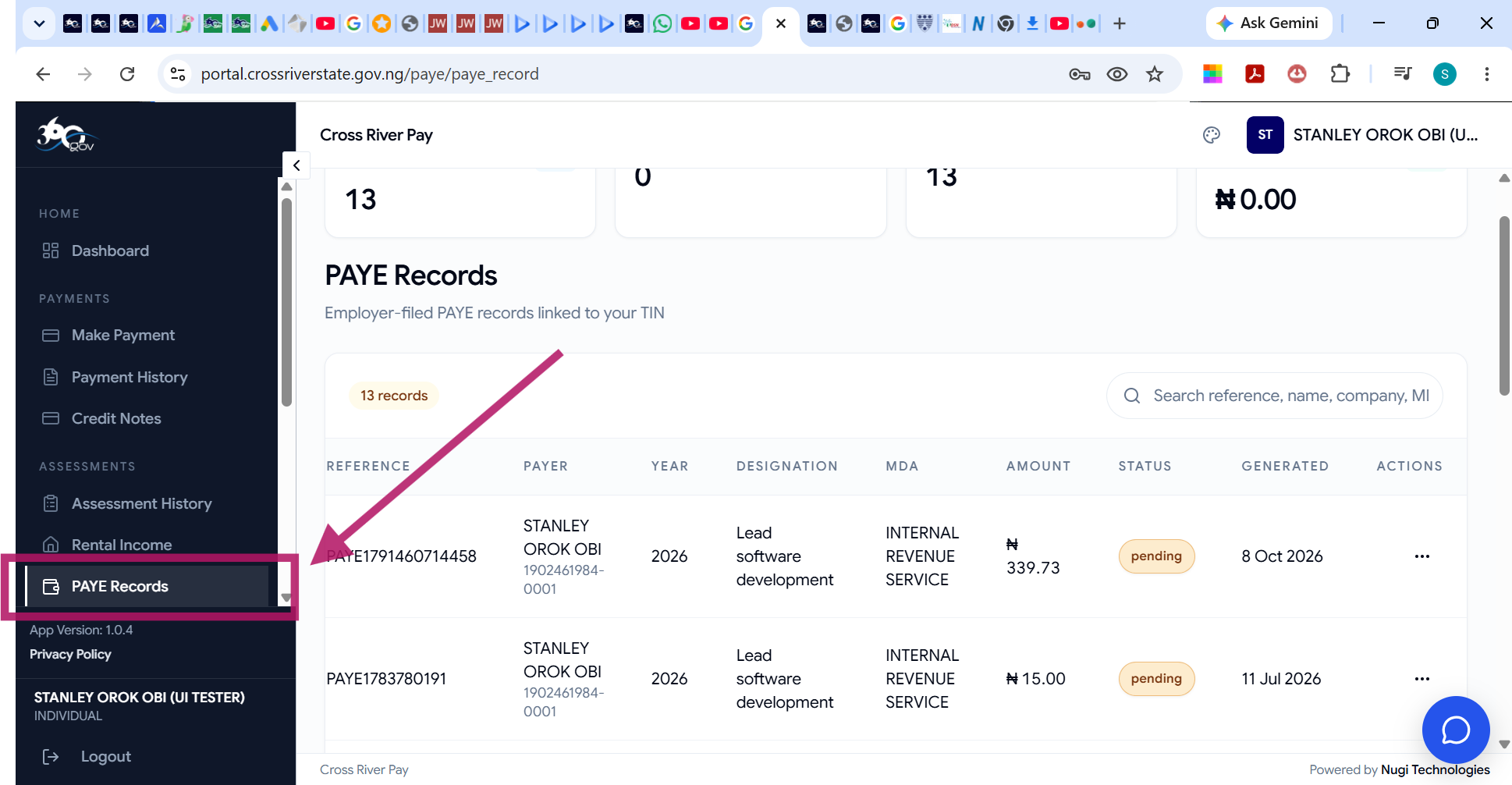
Look for any section that provides information about your PAYE assessments, tax payments, receipts, or tax history.
If your account provides the relevant information, identify the period you want to check.
For example, if you want to verify your September PAYE, make sure you are looking at the record for September rather than another month or year.
Check the information displayed against your payslip and any tax documentation supplied by your employer.
If the platform does not provide employee-level PAYE filing information, contact your employer's payroll or human resources department and request confirmation of the filing and remittance for the relevant period.
5. How to Interpret What You Find
When checking PAYE records, do not focus on a single status without understanding what it means.
Here are some possible situations and the appropriate next steps.
Situation A: The return has been filed and the payment is confirmed
If the relevant PAYE return has been processed and the corresponding payment is confirmed, retain any available statement or receipt for your records.
This is a positive indication that the relevant period has been accounted for.
Situation B: The return has been filed, but payment is pending
This may mean that the filing process has been completed but the payment has not yet been confirmed.
Ask your employer to clarify the payment status and provide supporting evidence where appropriate.
Situation C: Payment is recorded, but the filing status is pending or unresolved
A payment record alone may not establish that every filing requirement has been completed.
Ask your employer or CRIRS to clarify the status and determine whether any further action is required.
Situation D: No record is displayed
Do not immediately conclude that your employer has failed to remit your PAYE.
The information may not be available in your account, the relevant period may not yet have been processed, or the records may require reconciliation.
Request clarification from your employer and, if necessary, the tax authority.
Situation E: The amount does not match your payslip
If the tax amount shown in the available records differs from the PAYE deducted from your salary, ask for a reconciliation.
Your employer should be able to explain the difference between the amount deducted, the amount reported in the return, and the amount paid.
6. What If Your Employer Says the PAYE Has Been Paid?
It is reasonable to ask for evidence.
You can politely request confirmation of the filing and payment for the relevant month.
Depending on the applicable process, supporting evidence may include:
A copy or reference for the filed PAYE return.
The relevant payment receipt or transaction reference.
Confirmation of the period covered by the return and payment.
Clarification of any outstanding or unresolved status.
Make sure the evidence relates to your employer, the correct tax period, and the relevant PAYE obligation.
A payment receipt should not be confused with proof that every employee's record has been correctly reported. Where necessary, request confirmation that your own employment and tax details were included in the relevant return.
7. What If Your Employer Has Not Filed or Paid?
If your employer cannot confirm the filing or payment, do not ignore the matter.
Start by contacting your employer's payroll, finance, or human resources department.
Explain the period you are concerned about and ask for clarification of the PAYE deductions made from your salary.
Keep copies of your payslips and any correspondence relating to the matter.
If the issue remains unresolved, contact the Cross River State Internal Revenue Service for guidance on how to verify the relevant records and what steps may be appropriate.
You can visit the official CRIRS chatbot for available taxpayer services and contact information:
Avoid making duplicate payments simply because a record is missing or unclear. First establish the actual status of the obligation with your employer and the tax authority.
8. Remember: Keep Your Own Tax Records
Your employer has important responsibilities in administering PAYE, but maintaining your own employment and tax records is also a sensible practice.
Keep your payslips, employment income statements, relevant PAYE confirmations, and other tax documents in an organised place.
Review your records periodically, especially when preparing your annual tax information or resolving a discrepancy.
If you change jobs, retain the tax records provided by your former employer. They may be useful when confirming your employment income and tax history.
Your PAYE Verification Checklist
Before concluding that your PAYE has been properly accounted for, ask yourself:
Have I identified the correct tax period?
Do I know how much PAYE was deducted from my salary?
Has the relevant return been filed?
Has the corresponding payment been confirmed?
Does the available information match my employment and tax records?
Do I have supporting evidence or know where to obtain it?
Have I sought clarification if anything remains unresolved?
If you cannot answer all these questions, take the next step and request clarification.
Your Tax Journey, Now Digital!
PAYE is more than a deduction on your payslip. It is part of your tax record, and understanding that record helps you ask the right questions and resolve discrepancies early.
CrossRiverPay 360 Gov is helping make tax administration more accessible through digital services. Use the available platform features, retain your records, and seek assistance whenever you need clarification.
Visit https://pay.crossriverstate.gov.ng/ to explore CrossRiverPay 360 Gov and take a more informed approach to your tax affairs.
Remember: a deduction on your payslip is not, by itself, confirmation that the corresponding PAYE return has been filed and the tax remitted. Where confirmation is needed, check the available records and ask the appropriate questions.
Was this article helpful?