
Imagine this.
You paid your tax several weeks ago. You remember making the payment. Your bank account was debited, and you were satisfied that everything had been settled.
Then, one day, someone asks you a simple question:
"Can you provide evidence of that payment?"
You reach for your phone. You scroll through your messages. You search your email. You check your bank alerts.
Nothing.
Or perhaps you find the debit alert but cannot locate the official tax payment receipt.
Suddenly, what should have been a straightforward matter becomes a stressful search for evidence.
Now imagine a different situation.
You open your saved records, locate the payment receipt, and produce it within seconds. The document contains the relevant payment details, and you have the evidence you need to help answer the enquiry.
What a difference!
This is why obtaining and keeping your tax payment evidence matters.
Paying your tax is important. Being able to demonstrate that you paid is equally important.
In this guide, you will discover what a tax payment receipt is, why you need it, how to look for your payment evidence on CrossRiverPay 360 Gov, and how to protect your records for future use.
Let's get started!
1. WHAT EXACTLY IS A TAX PAYMENT RECEIPT?
A tax payment receipt is an official record acknowledging a tax payment.
Depending on the payment system and the type of transaction, it may contain details such as the taxpayer's name, the amount paid, the date of payment, the tax type, and a transaction or receipt reference.
These details help connect the payment to the relevant taxpayer and tax obligation.
But here is something important to understand:
A bank debit alert is not necessarily the same as an official tax payment receipt.
Your bank alert may show that money left your account. A payment-provider confirmation may show the outcome of the transaction. An official tax receipt or recognised payment record may provide evidence that the payment has been recorded for the relevant tax obligation.
These documents serve related but different purposes.
Keep your bank evidence, but also obtain the official tax payment evidence made available through the appropriate process.
This is how the final receipt looks. with the following feature:
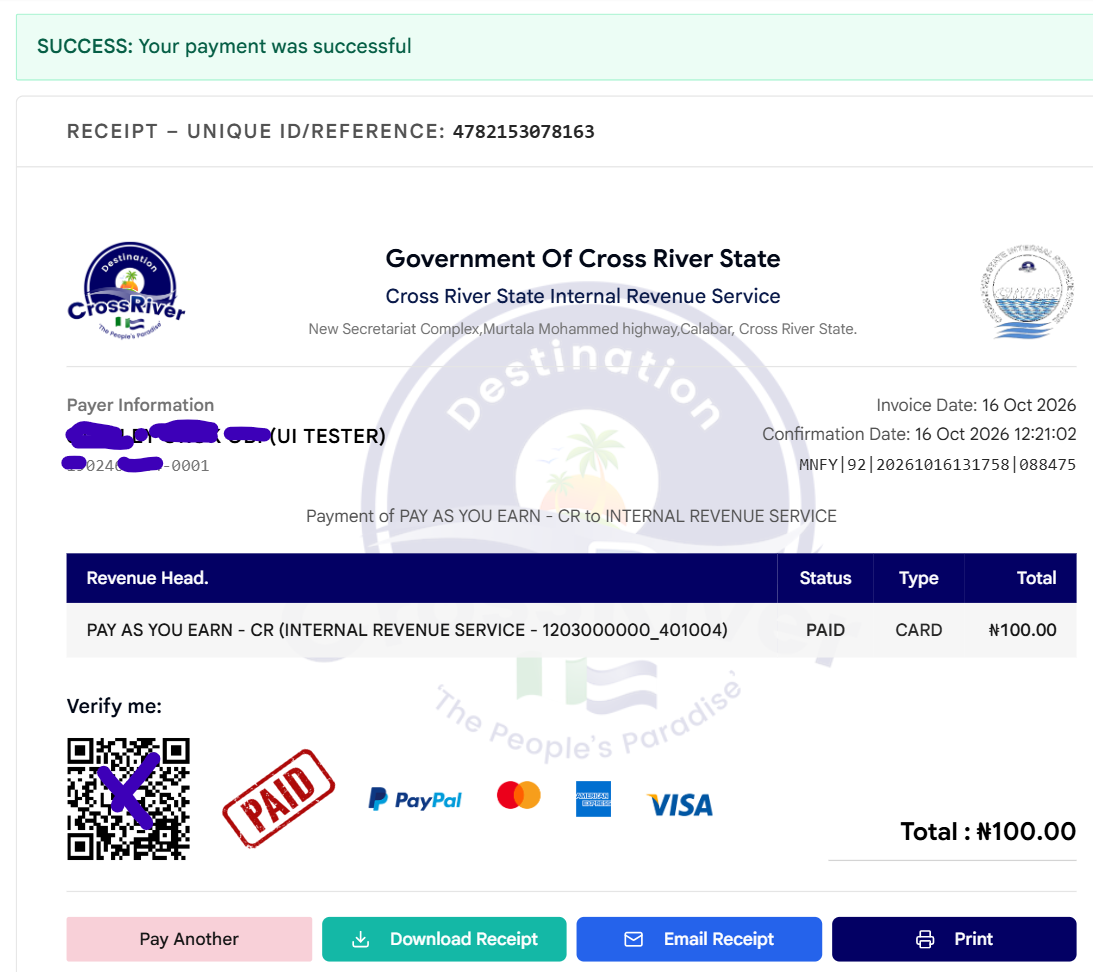
Unique Payment Reference
Logos of the state and CRIRS
Payer information
Date of payment
Revenue head paid for
Payment Status
Payment type
Payment amount
Means of verifying payment in this case: QR Code
These receipts are downloadable, emailed or printed to a local printer
2. WHY SHOULD YOU NEVER IGNORE YOUR TAX RECEIPT?
You might be thinking, "If I have already paid, why should I worry about downloading a receipt?"
Here are five reasons.
Reason 1: It helps you demonstrate that you paid
If questions arise about a tax payment, the relevant receipt or official payment record can help establish what was paid and when.
Reason 2: It helps resolve payment disputes.
Suppose a payment is not immediately reflected in your tax account. Your transaction reference and available payment evidence may help the appropriate team investigate the matter.
Reason 3: It supports your financial records.
If you operate a business, keeping organised tax payment records helps you track statutory payments and maintain a clearer financial history.
Reason 4: It helps you retrieve information when you need it.
You may need to confirm the date of a payment, the amount involved, or the tax period it covered. A properly stored receipt makes that information easier to retrieve.
Reason 5: It gives you peace of mind.
Instead of relying on memory or searching through months of bank notifications, you have a record you can access when necessary.
A receipt does not eliminate every possible tax dispute, but keeping reliable evidence puts you in a better position to respond to questions about your payment.
3. HOW TO FIND YOUR TAX PAYMENT RECEIPT ON CROSSRIVERPAY 360 GOV
Now let's move from theory to practice.
To begin, visit and log in to the official CrossRiverPay 360 Gov website:
https://pay.crossriverstate.gov.ng/
Once the platform opens, follow the instructions relevant to your taxpayer account and payment.
STEP 1: Open the official platform and log in.
Use your phone or computer to visit the website. If you don't know how to log in, please visit the article below
How to create your CrossRiverPay account
Make sure you are accessing the correct platform before entering any personal or payment information.
STEP 2: Locate your payment records.
Look for the available section or service used to view completed payments, payment history, transaction records, receipts, or payment confirmations.
If you are having trouble visiting your payment records, please visit the links to the tutorial page below
Payment Time! How to Pay Your PAYE - Just a Click Away
The exact name and location of this feature depend on the platform's current interface.
If you cannot locate the relevant service, follow the official help instructions or contact the appropriate support channel.
STEP 3: Identify the payment.
Where the platform allows you to search or filter payment records, use the information requested to locate the correct transaction.
You may need your transaction reference, payment date, tax type, taxpayer details, or other identifying information.
Check carefully if you have made several payments.
You do not want to download evidence for the wrong transaction.
STEP 4: Confirm that the payment was successful.
Before treating a receipt as evidence of a completed payment, establish the transaction's status.
If the payment is still pending or unresolved, follow the appropriate verification process.
Do not assume that a receipt-like document or bank notification necessarily means the intended tax liability has been settled.
STEP 5: Open the available receipt or payment record
If the platform provides a receipt or official payment confirmation for the transaction, open it and review the information displayed.
Check that the document corresponds to the correct taxpayer, amount, tax obligation, and payment date.
STEP 6: Download or save the document
If a download or print option is available, use it to save a copy.
Give the file a name that will help you identify it later.
For example:
TaxPayment_2026_September_TransactionReference.pdf
Use the actual payment period and reference applicable to your transaction.
If the platform does not provide a downloadable receipt, follow its official procedure for obtaining the available payment evidence.
Important: These instructions describe the general process. The exact menu names, receipt options, and download features should be confirmed against the live CrossRiverPay 360 Gov platform before publication.
4. WHAT IF YOU CANNOT FIND YOUR RECEIPT?
First, don't panic.
Not finding a receipt immediately does not necessarily mean that your payment has disappeared.
Follow these steps.
Check your payment history.
If the platform provides a payment history, look for the relevant transaction.
Search your email and messages.
Depending on the payment method, you may have received a transaction notification or confirmation.
Check your bank records.
Your bank statement or transaction notification may help establish the date and amount of the debit.
Remember, this evidence may help trace a payment, but it is not necessarily a substitute for an official tax payment receipt.
Contact the appropriate support channel.
If you still cannot locate the receipt, provide the relevant transaction details and request assistance in retrieving the available official payment evidence.
Keep any support reference you receive.
Do not make another payment simply because you cannot find the receipt. First establish whether the original payment was successful and correctly recorded.
5. WHAT INFORMATION SHOULD YOU CHECK ON YOUR RECEIPT?
Once you obtain your receipt or official payment record, take a moment to review it.
Where the information is provided, check the following:
Information | Why It Matters |
|---|---|
Taxpayer name or identification | Helps establish whose payment the record concerns. |
Amount paid | Helps you confirm the amount recorded. |
Payment date | Helps you identify when the transaction occurred. |
Tax type or liability | Helps establish which obligation the payment relates to. |
Transaction or receipt reference | Helps identify the payment during a query or investigation. |
Payment status | Helps you understand whether the transaction has been recorded as successful. |
Relevant tax period | Helps distinguish one obligation from another when the record includes this information. |
The precise information on your receipt may vary.
If you notice an error, do not alter the document yourself. Preserve the original record and contact the appropriate tax authority or support team to request clarification or correction.
6. HOW TO KEEP YOUR TAX RECEIPTS SAFE
Downloading your receipt is only half the job. You must also be able to find it when you need it.
Here is a simple record-keeping system you can adopt.
Create a dedicated tax folder.
On your phone or computer, create a folder named:
TAX PAYMENT RECORDS
Within it, organise receipts by year.
For example:
Tax Payment Records
2026
2027
2028
If you make many payments, you can create additional folders for different tax types or payment periods.
Use meaningful file names
Avoid saving every receipt with a generic name such as Document1.pdf.
Instead, use a consistent naming format that helps you identify the tax type, period, and transaction.
Do not put unnecessary sensitive personal information in file names.
Keep a secure backup.
Where appropriate, keep a backup in a secure storage location.
Use strong passwords and appropriate access controls, particularly if the records contain taxpayer identification or financial information.
Retain records for the required period.
Follow the applicable legal record-retention requirements for your tax obligations.
If you are uncertain how long a particular record must be retained, seek guidance from the appropriate tax authority or a qualified tax professional.
Keep records accessible.
A receipt is most useful when you can retrieve it quickly.
Organise your files so that you can locate a particular payment without searching through hundreds of unrelated documents.
Your goal is simple: when someone asks for evidence of a payment, you should know exactly where to find it.
7. FIVE RECEIPT-RELATED MISTAKES TO AVOID
Mistake 1: Relying entirely on bank alerts.
Keep bank evidence, but also obtain the official tax payment evidence available for the transaction.
Mistake 2: Downloading a receipt without checking the details.
Confirm that it relates to the correct taxpayer and tax obligation.
Mistake 3: Saving receipts randomly.
Use a consistent folder and naming system.
Mistake 4: Editing a receipt to correct an error.
Never alter official payment evidence yourself. Request correction through the appropriate process.
Mistake 5: Sharing receipts carelessly.
Payment records may contain sensitive personal or financial information. Share them only with appropriate recipients through suitable channels.
Avoiding these mistakes helps protect both your records and your personal information.
8. YOUR TAX PAYMENT RECEIPT CHECKLIST
Before closing your payment record, ask yourself:
Have I located the correct transaction?
Have I confirmed its status?
Have I obtained the available official receipt or payment confirmation?
Have I checked the amount and other relevant details?
Have I saved a copy securely?
Can I retrieve it easily when needed?
Do I know how long I am required to retain it?
If you can answer these questions confidently, you are building good tax record-keeping habits.
LET'S TEST YOUR KNOWLEDGE!
Imagine that you paid your tax online three months ago.
Today, you need to demonstrate that you made the payment, but you cannot find the receipt.
You have located your bank debit alert, but you have not been able to retrieve the official tax payment record.
What should you do?
A. Make another payment immediately.
B. Edit the bank alert and use it as your official tax receipt.
C. Use your bank evidence and transaction details to trace the payment through the appropriate official channel, verify its status, and request the available official payment evidence.
The correct answer is C.
A missing receipt does not automatically mean that the payment failed. Equally, a bank debit alert alone may not establish that the intended tax liability was settled.
The sensible approach is to trace the original transaction, verify the outcome, and obtain the appropriate evidence.
THE BIG TAKEAWAY: NEVER PAY AND FORGET
Your tax payment record is more than a document sitting in a folder. It is part of your financial history and can be an important source of evidence when questions arise.
Make it a habit to verify your payment, obtain the available official receipt or confirmation, check its details, and store it securely.
That small habit can save you time, reduce uncertainty, and make managing your tax obligations easier.
You have done your part by making the payment. Now do the smart thing by keeping the evidence.
Pay responsibly. Verify carefully. Keep your records safely.
NEXT GUIDE
Payment Failed? Don't Panic — What to Do When a Tax Payment Fails
Because when a transaction does not go as planned, knowing what to do next can make all the difference.
Was this article helpful?