
Picture this.
You have just paid your tax online. You followed the instructions, authorised the transaction, and waited for confirmation.
Suddenly, your phone buzzes.
Transaction Alert: Your account has been debited.
You breathe a sigh of relief. The money has left your account, so everything should be fine, right?
Not so fast!
You open CrossRiverPay 360 Gov, expecting to see your payment recorded. But the status is unclear. Perhaps it says Pending. Perhaps you cannot immediately find the transaction. Or maybe you have received a bank alert but no payment confirmation.
Your mind begins racing.
"Has the payment gone through?"
"Will I be asked to pay again?"
"What happens if the payment is not recorded before my deadline?"
If you have ever experienced this uncertainty, you are not alone. Electronic payments sometimes take time to process, and a bank notification does not always tell you the complete story.
The good news? There are sensible steps you can take to establish what happened.
In this guide, you will learn how to check your tax payment status, understand common transaction messages, and respond correctly when a payment does not appear as expected.
Let's clear up the confusion!
1. FIRST, UNDERSTAND WHAT YOUR PAYMENT STATUS MEANS
Before checking a transaction, it helps to understand the difference between making a payment and confirming that the relevant tax obligation has been settled.
A payment passes through a process. Depending on the payment method and systems involved, the transaction may need to be authorised, processed, confirmed, and reconciled with the appropriate tax record.
During this process, you may encounter different status messages.
Here is what common payment statuses generally mean.
Payment Status | What It Generally Means | What You Should Do |
|---|---|---|
Pending | The transaction has not yet reached a confirmed final status. | Allow processing time and check again. If it remains pending, follow the official support procedure. |
Successful | The payment system reports that the transaction was completed successfully. | Check the available tax payment record or official confirmation to establish that the correct liability has been settled. |
Failed | The transaction was not completed successfully according to the payment system. | Check whether your account was debited and follow the instructions for resolving the failed transaction. |
Processing | The transaction is still being processed. | Wait for the result and avoid initiating another payment until you have checked the original transaction. |
Reversed | A previous debit has been returned or reversed, subject to the transaction details. | Confirm the reversal with your bank or payment provider and establish whether the tax liability remains outstanding. |
Not Found | The transaction could not be located using the information supplied or available search options. | Verify your reference and taxpayer details, then seek assistance if necessary. |
Important: These are explanations of common payment-system statuses, not a guarantee that CrossRiverPay 360 Gov displays every label listed here. The exact status messages and their meanings depend on the live platform and payment provider.
The principle remains the same: understand the message before deciding what to do next.
2. HOW TO CHECK YOUR PAYMENT STATUS
Now let's get practical.
If you have made a tax payment and want to establish its status, follow this general process.
STEP 1: Visit the official platform
Open your browser and visit AND Login:
https://pay.crossriverstate.gov.ng/
Make sure you are using the correct website.
STEP 2: Locate the relevant payment service.
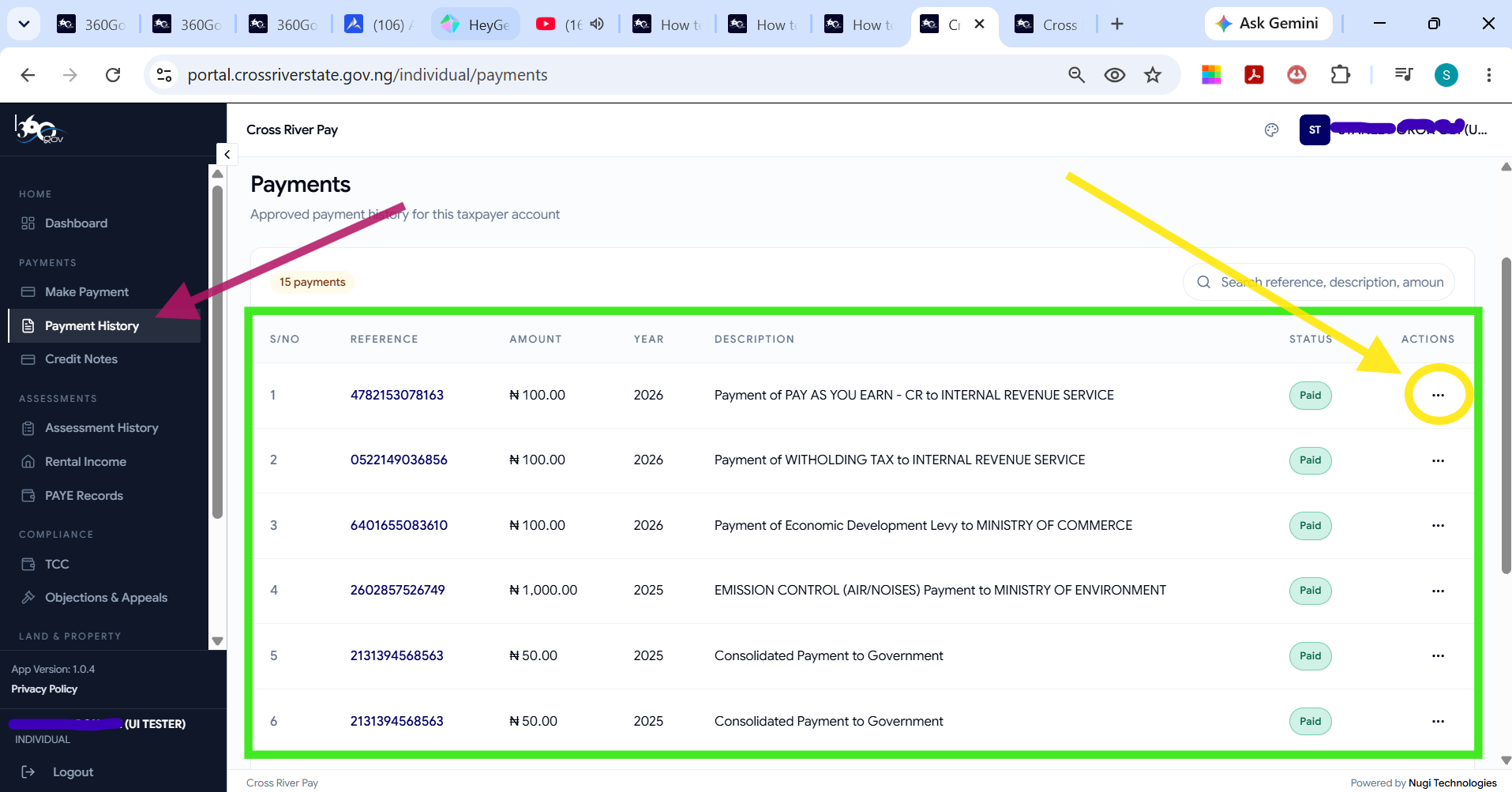
Follow the available instructions to access your taxpayer account, payment history, transaction record, or other relevant payment-verification service.
The exact navigation will depend on the options available in the current version of the platform.
STEP 3: Identify the transaction.
Where the platform provides a transaction search or payment history, use the details requested to locate your payment.
You may need information such as:
Your taxpayer identification details.
Your payment reference or transaction reference.
The date you initiated the payment.
The tax type or assessment reference.
The amount involved.
Only enter information into the appropriate official interface.
STEP 4: Read the displayed status carefully.
Once you locate the transaction, examine the status shown.
Does it indicate that the payment was successful? Is it still pending? Has it failed? Is the transaction missing altogether?
Do not interpret an unclear message as proof that your payment has failed.
If you cannot establish the meaning of the displayed status, consult the official support channel.
STEP 5: Check the associated tax liability.
Where the platform provides the relevant information, verify that the payment corresponds to the correct taxpayer and tax obligation.
A successful transaction should not simply be assumed to have settled a different liability.
STEP 6: Keep your payment evidence.
Save the transaction reference and evidence of debit alerts via email. This is because these alerts contain references you can use to trace the status of the transaction, along with payment confirmations, receipts, and any relevant bank notifications.
These records can help the appropriate support team trace the transaction if an investigation becomes necessary.
Your objective is not merely to find a transaction. It is to establish what happened to your money and whether your tax obligation has been correctly recorded.
4. WHAT IF YOUR BANK SAYS SUCCESSFUL BUT YOUR TAX PAYMENT IS NOT SHOWING?
This situation requires careful attention.
Your bank or payment provider may report that a transaction succeeded, while the corresponding tax payment record is not immediately visible.
There can be a difference between the status of a financial transaction and the status of its recording against a particular tax liability.
If this happens, take the following steps:
Confirm the transaction status with your bank or payment provider.
Retrieve the transaction reference and available payment evidence.
Check that the payment was made using the correct taxpayer details and payment reference.
Use the official payment-verification or support procedure to trace the transaction.
Ask the appropriate tax authority or payment support team to investigate whether the payment has been received and correctly allocated.
Do not assume that the tax authority has received the money merely because your bank account was debited.
Equally, do not assume that the money has disappeared simply because the tax record has not yet updated.
The right response is verification, not guesswork.
5. WHAT IF YOUR PAYMENT STATUS SAYS FAILED?
A failed transaction can mean different things depending on where the failure occurred.
For example, a payment may fail before the money is debited. In other cases, a transaction may be interrupted while its final status is being established.
Your first task is to determine whether money actually left your account.
If your account was not debited
Check the transaction status and follow the payment provider's instructions before trying again.
Make sure the correct payment details are still selected.
If your account was debited
Do not assume that the transaction failed completely simply because a failure message appeared.
Check your bank statement and retain the transaction reference. Contact the relevant support channel to establish whether the payment was received, reversed, or remains unresolved.
If the transaction was reversed
Confirm that the money has actually been returned to your account and check whether the tax obligation remains unpaid.
A reversed payment generally means that the original transaction has not provided a completed payment to rely on. However, the precise outcome must be established from the transaction record.
Never treat a failed or reversed transaction as settled tax without appropriate confirmation.
6. WHAT IF YOU CANNOT FIND YOUR PAYMENT?
Sometimes, the difficulty is not a pending or failed status. It is the inability to locate the transaction.
Before concluding that something has gone wrong, check the following:
Did you enter the correct transaction reference?
Are you using the correct taxpayer identification details?
Did you select the correct date range, if a date filter is available?
Are you looking at the correct tax account or payment record?
Do you have a bank notification or other evidence that can help identify the transaction?
If you still cannot locate the payment, contact the appropriate support channel.
Provide enough information to help the team investigate, but never send your banking PIN, password, or one-time password.
A transaction that cannot immediately be found should be investigated rather than ignored.
7. THE FOUR PIECES OF EVIDENCE THAT CAN SAVE YOU TIME
When contacting support about a payment problem, preparation makes a difference.
Keep these four important pieces of information available.
1. Transaction reference
This helps identify the specific payment attempt.
2. Date and amount
These details help narrow down the transaction being investigated.
3. Bank or payment-provider evidence
Where available, retain the debit notification, statement entry, or transaction confirmation.
4. Tax payment details
Keep the relevant assessment reference, tax type, taxpayer identification details, or other information needed to establish which obligation you intended to settle.
Together, these details can help the relevant team trace the transaction more efficiently.
Keep copies of your evidence and record any support reference issued during the investigation.
8. FIVE PAYMENT-STATUS MISTAKES YOU SHOULD NEVER MAKE
Let's make sure you do not fall into these common traps.
Mistake 1: Assuming that a debit alert proves the tax is settled.
A debit alert is evidence of an account transaction, not conclusive proof that the correct tax liability has been settled.
Mistake 2: Paying again because you are impatient.
A delay in updating the payment record does not automatically mean the first transaction failed.
Mistake 3: Ignoring a pending payment.
If the transaction remains unresolved, investigate it instead of assuming everything will eventually work out.
Mistake 4: Throwing away transaction evidence.
Your reference and payment records may be essential when tracing a payment.
Mistake 5: Assuming a successful transaction settled the correct tax.
Check the associated taxpayer and liability details wherever that information is available.
Avoiding these mistakes can help protect your money and reduce unnecessary disputes.
9. YOUR PAYMENT VERIFICATION CHECKLIST
Before considering a payment successfully completed, ask yourself:
Have I located the correct transaction?
Have I checked its current status?
Have I confirmed the amount and transaction reference?
Have I verified the associated tax liability where the platform provides that information?
Have I obtained the available official payment confirmation?
Have I saved my payment evidence?
If the transaction is unresolved, have I followed the appropriate support procedure?
If the transaction is pending, failed, reversed, or missing, take the appropriate next step instead of assuming that the obligation has been settled.
LET'S TEST YOUR KNOWLEDGE!
Imagine you are a business owner in Calabar.
You pay your tax online. Your bank sends you a debit alert, but CrossRiverPay 360 Gov still shows that the payment is pending.
You have an important question:
Should you immediately make another payment to avoid being considered a defaulter?
A. Yes. Make another payment immediately.
B. No. Ignore the issue and assume the payment will eventually appear.
C. Preserve the transaction evidence, check the payment status, and follow the appropriate verification procedure before deciding whether another payment is necessary.
The correct answer is C.
Making a second payment without investigating the first transaction could expose you to a duplicate payment. Ignoring the problem could also leave an unresolved tax obligation.
The responsible approach is to establish what happened and take action based on verified information.
THE BIG TAKEAWAY: NEVER GUESS. ALWAYS VERIFY.
You have worked for your money. When you make a tax payment, you should be able to establish what happened to that money and whether your tax obligation has been settled.
That is why payment verification matters.
Check the status. Understand the message. Keep your evidence. Investigate unresolved transactions. And never make a second payment simply because you are uncertain about the first.
Digital tax administration works best when taxpayers know how to use the available services and understand how to protect their interests throughout the payment process.
A debit alert tells you that money moved. Proper verification helps you establish what happened next.
Now that you know how to check your payment status, there is one more important question.
Where do you get the document that proves your payment, and how do you keep it safe for future use?
NEXT GUIDE
Your Proof of Payment Matters — How to Download Your Tax Payment Receipt
Because paying is important. Confirming is essential. And keeping your evidence is smart.
Was this article helpful?